Orchestrator
Overview
This library is responsible for orchestrating asynchronous tasks. It provides some consumers that handle events raised within the application or subscribe to a RabbitMQ queue for messages published from external execution services.
We have two consumers: EventConsumer and FeedbackConsumer. The first is used for "internal" events (events originating from one of our libraries) and the second for "external" events (events received from RabbitMQ). Their only job is to receive the message and call the correct function from the appropriate service.
Event Consumers
Internal (Redis)
The following events are registered and handled:
DCJ_CREATED: Raised when a data check-in job was created. Currently it only adds a log entry for the creation of the job.DCJ_DELETED: Raised when a data check-in job was deleted. It sends a 'cancel' message to the RabbitMQ for each of the deleted job's steps, to kill them and free resources.DCJ_CONFIGURED: Raised when a data check-in job step was finalised. It parses the step's configuration and process accordingly (see Process Configuration below)DCJ_STEP_UPDATED: Raised when a data check-in job step was updated. It parses the step's updated configuration and process accordingly (see Process Configuration below)DCJ_STEP_RESCHEDULE: Raised when a data check-in job step should start (scheduled event). If the step is ready to be executed (is configured and not already Queued or Running), then its configuration is prepared and submitted to execution director for further execution.USER_CREATED: Raised when a new user was created/registered. It creates a new bucket in MinIO for user's files.ORGANISATION_CREATED: Raised when a new organisation was created. It creates a new bucket in MinIO for organisation's files.
External (RabbitMQ)
The FeedbackConsumer is listening for messages in a feedback topic in RabbitMQ. These messages are expected to have the following structure:
export interface IFeedback {
    jobId: number;
    stepId: number;
    serviceType: string;
    reason: FeedbackType;
    message?: {
        progress?: Record<string, any>;
        error?: string;
        errorCode?: number;
    };
    stats?: Record<string, any>;
    files: { name: string; size: number; mimeType: string }[];
    processed?: string[];
    unprocessed?: string[];
}
The supported reasons are:
cancelled: Step execution cancelled by user intervention,completed: Step execution completed successfuly,continue: Step is still running but it saved data to MinIO. It is used by Kafka and API polling harvesters to notify the backend that a file was saved, and, if configured to do so, start the next step,progress: Step is still running but it has made any kind of "progress". Used in a similar way ascontinue, BUT it never triggers the execution of the next step, as these messages are raised by short-lived services, that will eventually becompleted,failed: Step execution failed. Expected to return anerrorCodeand anerrormessage.started: Service container for this step is created and the execution has started,
For details on how we handle external events, see the Process Message section below.
Orchestrator
Process Configuration
Whenever a step is finalised and every time it is updated afterwards, its configuration goes through the configuration flow:
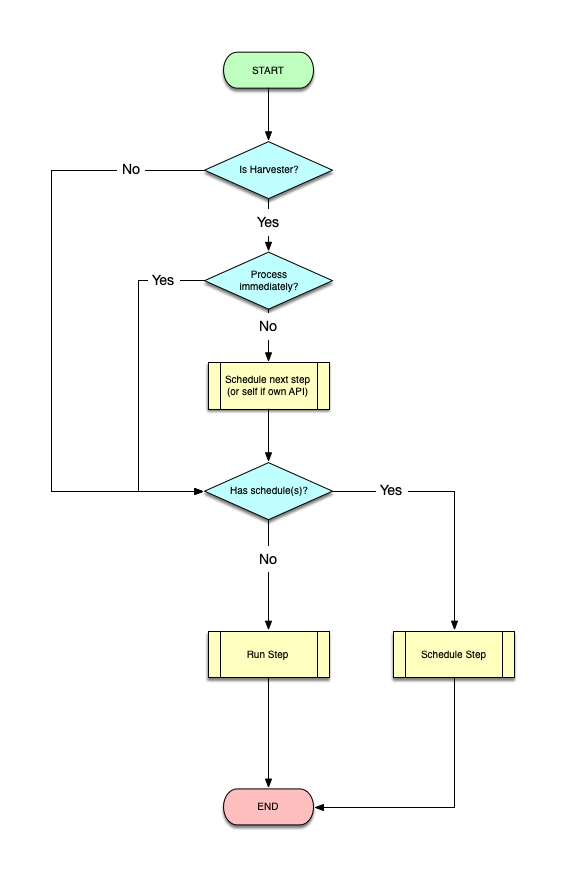
Note: Scheduling either next or current step is done by setting the
scheduleproperty of the step and calling thescheduleStepfunction of the Task Scheduler service.
Run Step
If a step has schedules, it is run by the scheduler using the "DCJ_STEP_RESCHEDULE" event. Otherwise, the execution is initiated by:
- The user, by finalising (or updating) the step's configuration
- The previous step, when its execution is completed OR a
continuemessage arrives.
Running a step goes through the following flow:
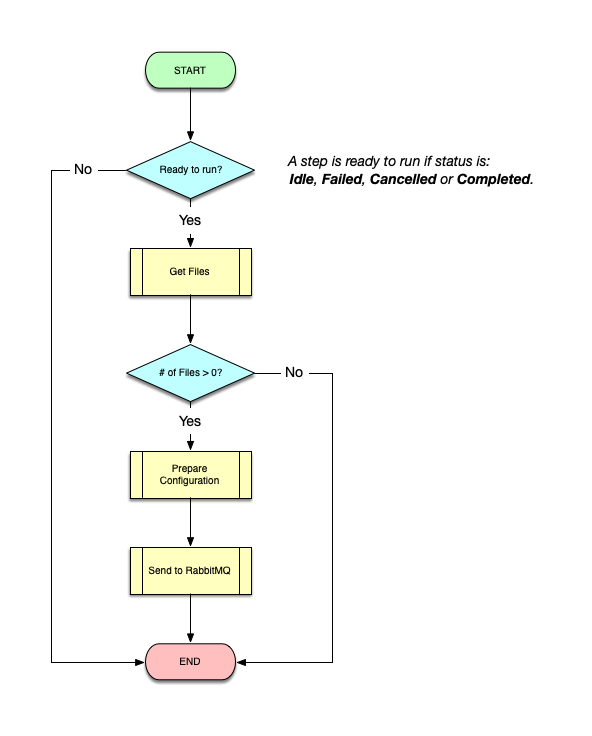
Note: Preparing the configuration includes: (a) generating a presigned MinIO url for each file to be processed, (b) generating a presigned url for uploading files back to MinIO and (c) appending a token for retrieving private information from Vault (generated using the
VaultServicefrom vault library).
Process Message
Whenever a message arrives in the RabbitMQ queue, it is goes through the following flow:
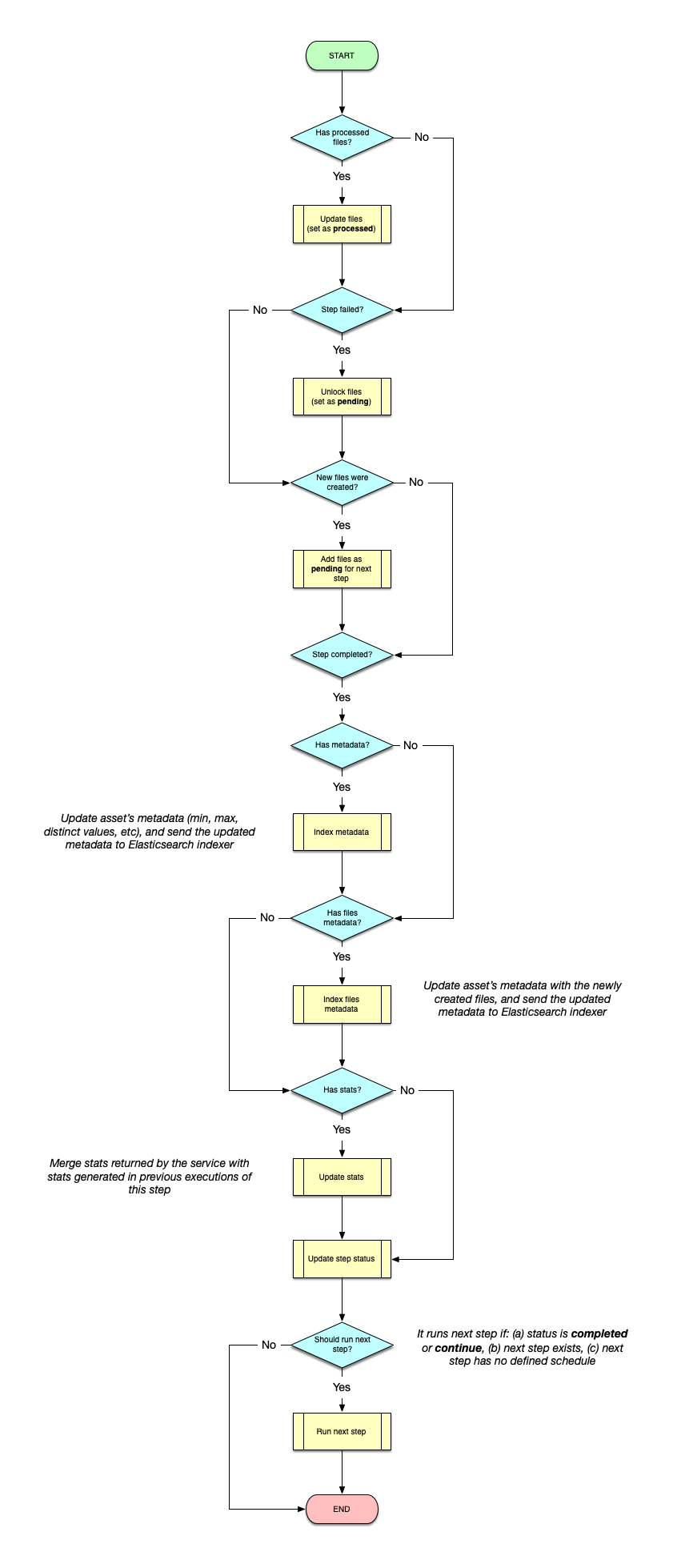
Notes:
- Adding/unlocking/changing the status of files is done using the
FileServicein theminio library.- Updating and indexing metadata and files metadata is done using the
AssetServicein the asset library.- Merging stats is done using the
StepServicein data check-in library.
Task Scheduler
Schedule Daily Tasks
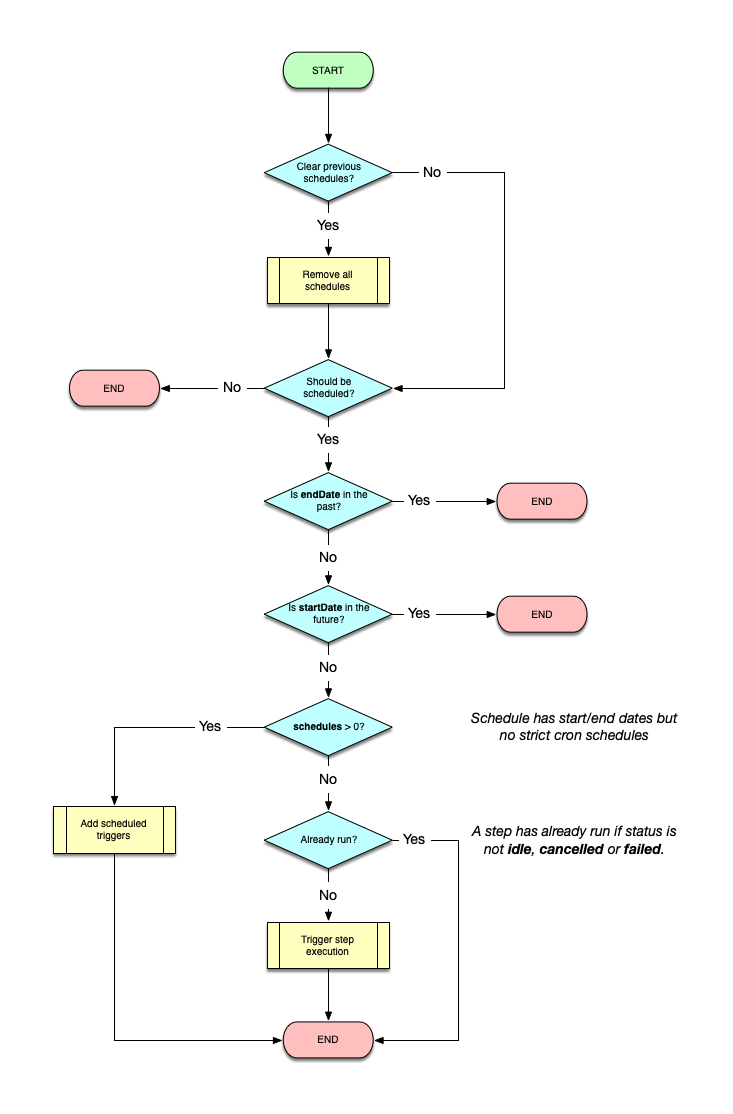
Even though we allow the users to set any date for their tasks (steps) to be executed, we only schedule tasks on a daily basis, every day at midnight (UTC). This is done by retrieving any tasks (steps) that have defined schedules and, if configured, are added to the scheduler. In parallel, any expired schedules are cleared.
(Re)Start Scheduler
As the scheduling is done using an in-memory queue, whenever the backend is (re)started we need to re-schedule everything. To do so, we re-schedule daily tasks (as described above), WITHOUT clearing expired schedules, as this will be performed automatically at midnight.
Schedule Step
Scheduling a step goes through a set of checks and, eventually, a DCJ_STEP_RESCHEDULE event is scheduled to be triggered according to user's configuration, which will result (as seen above) to the execution of the step.